
Small business owners have a lot to manage. Between answering phone calls, responding to website inquiries, replying to messages, scheduling appointments, and following up with potential customers, customer service can quickly become overwhelming.
When a customer reaches out, they usually expect a quick response. If your business is busy or closed for the day, they might contact a competitor instead.
This is where AI customer service tools can help.
The right tool can answer common questions, manage customer conversations, respond to inquiries, automate follow-ups, and help your team save time. Some tools focus on website chat and support tickets, while others specialize in phone answering, messaging, or lead management.
But with so many options available, which one should you choose?
In this guide, we’ll explore 10 AI tools for small business customer service in 2026, what each tool offers, who it may suit, and what to consider before choosing one.
What Is an AI Customer Service Tool?
An AI customer service tool uses artificial intelligence and automation to help businesses manage customer interactions. Depending on the platform, it may communicate through a website chatbot, phone call, text message, email, or customer support portal.
These tools can help businesses:
- Answer frequently asked questions.
- Respond to customer inquiries.
- Provide support outside regular business hours.
- Collect information from potential customers.
- Schedule appointments.
- Follow up with leads and customers.
- Organize support requests.
- Route complex questions to a human team member.
For example, imagine a homeowner contacts an HVAC company while the technician is repairing a unit at another property. Instead of leaving the inquiry unanswered, an automated system could respond, collect basic job details, and help the customer move toward booking an appointment.
The goal is not necessarily to replace human customer service. It is to handle routine tasks more efficiently so business owners and their teams can focus on work that needs their attention.
10 Best AI Tools for Small Business Customer Service in 2026
The best AI customer service tool depends on how your business communicates with customers. Some platforms focus on website chat, others organize support tickets, and some help businesses answer calls, follow up with leads, or manage customer conversations.
Here are 10 tools to consider, starting with Capinity for contractors and local service businesses that want to capture more leads and book more appointments.
1. Capinity – Best for Lead Response and Follow-Up Automation
Recommended for contractors
Website:
Capinity is an AI automation and local marketing agency built specifically for home service contractors. It helps businesses capture inquiries, respond to potential customers, follow up automatically, and book estimates without requiring the owner to manage every conversation manually.
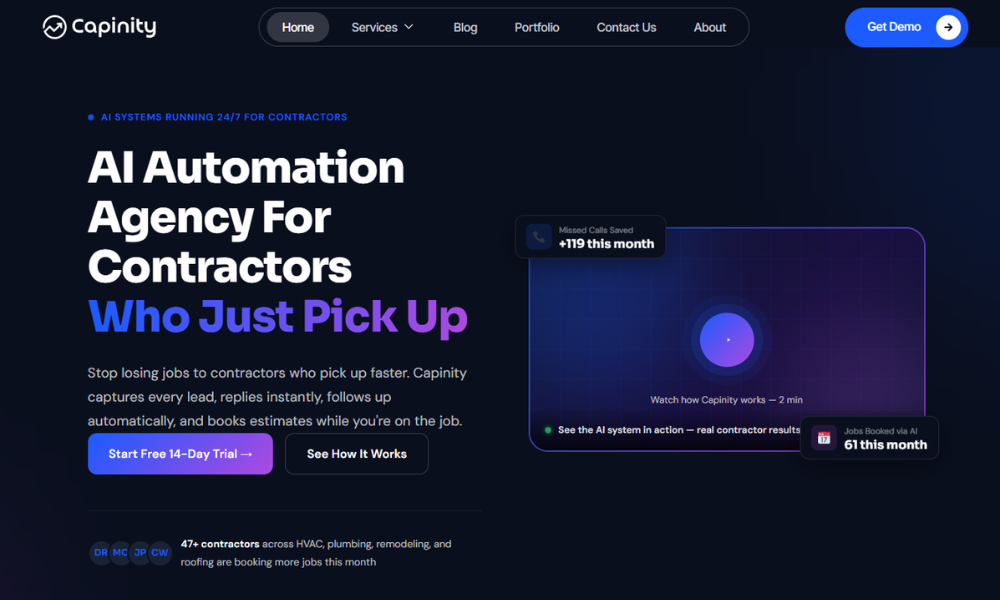
For contractors, customer service often starts before a customer becomes a paying customer. A homeowner may call to ask about a repair, submit a website form, or request an estimate. If the contractor is busy on a job, that inquiry can go unanswered.
Capinity helps address this problem with connected lead-response and follow-up systems.
Key features include:
- AI chatbot and instant responses to new inquiries.
- Automated text messages for missed calls.
- SMS and email follow-up sequences.
- Appointment and estimate booking workflows.
- Centralized lead tracking and reporting.
- Local SEO and Google Business Profile optimization.
Best for: HVAC companies, plumbers, roofers, remodelers, and other home service contractors who need to respond to leads while working in the field.
What to consider: Capinity is a specialized service rather than a general-purpose help desk for every type of business. It is most relevant to contractors who want lead capture, follow-up, booking, and local marketing support in a connected system.
Pricing and trial: Capinity offers a free 14-day trial with setup included and no credit card required. You can book a demo to see how it works for your business.
Start Your Free 14-Day Trial →
2. Intercom – Best for AI-Powered Customer Support
Website:
Intercom is a customer communication and support platform focused on messaging, help desk workflows, and AI-assisted customer service.
Businesses can use it to communicate with website visitors, manage customer conversations, and automate parts of the support process. It may be useful for companies that receive a high volume of online questions and want to manage those conversations in one place.
Key features:
- Website chat and messaging.
- AI-assisted customer support.
- Shared inbox and conversation management.
- Help center and support workflows.
- Integrations with other business tools.
Best for: Online businesses, software companies, and customer support teams that handle many digital conversations.
What to consider: Evaluate the pricing structure, including any charges based on seats or AI usage, before choosing a plan.
3. Tidio – Best for Website Chat and Chatbots
Website:
Tidio combines live chat, chatbot automation, and AI customer support features. It can help small businesses respond to website visitors, answer frequently asked questions, and provide an easy way for customers to start a conversation.
For example, an online store could use a chatbot to answer questions about shipping, product availability, or returns before a customer contacts a support representative.
Key features:
- Website live chat.
- Automated chatbot conversations.
- AI-powered responses through its AI offering.
- Visitor communication and conversation management.
- Connections to supported business platforms.
Best for: Small businesses and online stores that want to make their websites more responsive.
What to consider: Check the limits on conversations, AI usage, and available integrations for your selected plan. A website chatbot alone may not be enough if your biggest challenge is missed phone calls.
4. Zendesk – Best for Customer Support Ticket Management
Website:
Zendesk is a customer service platform that helps businesses organize customer requests across support channels. Its help desk tools allow teams to track issues, manage tickets, and coordinate responses.
AI features can support agents and automate parts of the service workflow, depending on the plan and configuration.
Key features:
- Customer support ticketing.
- Shared agent workspace.
- Support across multiple channels.
- Help center and knowledge base tools.
- AI-assisted support and workflow automation.
Best for: Businesses with dedicated support staff or a steady volume of customer service requests.
What to consider: Smaller businesses with simple needs may find a full ticketing platform more complex than necessary. Compare plan features and agent-based costs before committing.
5. Freshdesk – Best for Organizing Customer Requests
Website:
freshworks.com/freshdesk
Freshdesk helps businesses manage support tickets and customer communications. Its AI capabilities, offered through Freshworks’ support tools, can assist with tasks such as organizing requests and helping support teams respond efficiently.
Instead of tracking every issue through separate emails, a business can use a shared system to see which requests are open, who is handling them, and what needs to happen next.
Key features:
- Ticket management.
- Shared customer support inbox.
- Workflow automation.
- Knowledge base and self-service resources.
- AI-assisted support features, depending on the plan.
Best for: Small and growing businesses that need a more structured way to manage customer support.
What to consider: Check which AI features are included in your preferred plan and whether additional usage fees apply.
6. HubSpot Service Hub – Best for CRM-Connected Customer Service
Website:
HubSpot Service Hub connects customer service workflows with HubSpot’s CRM. This can help businesses keep customer records, conversations, and service activity connected instead of storing information in separate systems.
For example, a sales team can review a customer’s previous interactions before following up on a question or resolving an issue.
Key features:
- CRM-connected customer records.
- Shared inbox and customer conversations.
- Ticketing and service workflows.
- Customer feedback tools.
- AI-assisted features available in supported products and plans.
Best for: Small businesses that already use HubSpot or want customer service connected to their sales and marketing activity.
What to consider: Compare the features available at each subscription level. Advanced automation and reporting may require a higher-tier plan.
7. Smith.ai – Best for Phone Answering and Virtual Receptionists
Website:
smith.ai
Smith.ai provides AI and human-assisted receptionist services for businesses that need help handling incoming calls and qualifying potential customers.
For service businesses, phone calls can be especially important. A potential customer may be calling to ask about availability, explain a problem, or request an estimate. Having a reliable process for handling those calls can help prevent inquiries from being overlooked.
Key features:
- Call answering and intake.
- Lead qualification.
- Call routing and message handling.
- Appointment-related workflows, depending on the setup.
- Options involving AI and human receptionists.
Best for: Professional service businesses and companies that receive important inquiries by phone.
What to consider: Review the service options, call limits, integrations, and pricing. Confirm which tasks are handled by AI and which involve human receptionists.
8. Podium – Best for Local Business Messaging
Website:
podium.com
Podium focuses on customer communication and interactions for local businesses. Its platform supports business messaging and reputation-related workflows, helping companies manage conversations with customers.
This can be useful for businesses that receive inquiries through multiple channels and want a more organized way to communicate with customers.
Key features:
- Customer messaging.
- Centralized conversations.
- Review management tools.
- Automated customer communication.
- AI-enabled features, depending on the product and plan.
Best for: Local service businesses that want to manage customer messages and reputation-related activities.
What to consider: Check which communication channels and integrations are supported for your business. If automated lead follow-up and appointment booking are your main priorities, compare those workflows specifically.
9. Manychat – Best for Social Media Messaging Automation
Website:
manychat.com
Manychat helps businesses automate conversations through supported messaging channels, including social platforms. Businesses can create workflows that respond to messages, guide people through questions, and collect information from interested customers.
For example, a business could use an automated Instagram conversation to answer a common question or direct someone toward a booking page.
Key features:
- Messaging automation.
- Automated conversation flows.
- Lead information collection.
- Social messaging integrations.
- AI-related capabilities available in supported features.
Best for: Small businesses, creators, and brands that receive customer inquiries through social media and messaging apps.
What to consider: Check which channels, automation limits, and integrations are available on the current plan. It is primarily a messaging automation option, not a complete phone-based receptionist system.
10. Drift – Best for Website Conversations and Sales Qualification
Website:
drift.com
Drift is associated with conversational marketing and sales, helping businesses use website conversations to engage visitors and identify potential sales opportunities.
This type of platform is useful when a business wants to move beyond simply displaying a contact form and instead guide visitors toward a relevant conversation.
Key features historically associated with the platform include:
- Website conversations.
- Visitor engagement.
- Lead qualification.
- Sales routing and integrations.
Best for: Businesses focused on converting website visitors into sales conversations.
What to consider: Verify the current product availability, ownership, features, and purchasing options before including Drift in a final buying decision. Its offering and market position may differ from those of a traditional small-business support tool.
AI Customer Service Tools Comparison Table
Use this table to narrow down the options based on your main customer service need. The categories describe each platform’s general focus, not a verified ranking of overall quality.
Tool | Main focus | May suit |
Capinity | Lead response, missed-call follow-up, and booking | Contractors and home service businesses |
Intercom | AI support and digital messaging | Online support teams |
Tidio | Website chat and chatbots | Small businesses and online stores |
Zendesk | Tickets and multi-channel support | Structured support teams |
Freshdesk | Customer support workflows | Growing businesses |
HubSpot Service Hub | CRM-connected service | Businesses using HubSpot |
Smith.ai | Phone answering and receptionist services | Phone-driven businesses |
Podium | Local messaging and reputation | Local businesses |
Manychat | Social and messaging automation | Social-first businesses |
Drift | Website conversations and sales qualification | Sales-focused teams |
Before choosing: Verify current prices, feature availability, AI usage limits, and integrations directly with each provider. Pricing can vary significantly based on the number of users, conversations, calls, or AI interactions.
How to Choose the Right AI Customer Service Tool
The right tool is the one that addresses your biggest customer service bottleneck. Start by identifying where customer inquiries arrive and what happens after someone contacts your business.
1. Identify your biggest problem
Are you missing phone calls? Taking too long to answer website inquiries? Losing track of support tickets? Or forgetting to follow up with potential customers?
Choose a tool that addresses the specific problem rather than paying for features you may not need.
2. Choose the communication channels you need
A business that receives most inquiries through its website may need a chatbot. A contractor who spends most of the day at job sites may need missed-call responses and text follow-ups. A company with a support team may need a ticketing platform.
3. Check integrations
Make sure the tool works with your existing website, CRM, calendar, phone system, and messaging channels where relevant. Poor integration can create extra work instead of saving time.
4. Review the total cost
Look beyond the advertised starting price. Consider subscription fees, per-user charges, AI usage, call volume, setup costs, and additional integrations.
5. Test the customer experience
Before rolling out a tool, test common questions and realistic customer scenarios. Check whether responses are accurate, whether customers can reach a person when needed, and whether appointments or inquiries are recorded correctly.
6. Track measurable results
Measure response time, missed calls recovered, follow-up completion, appointments booked, customer satisfaction, and the time your team saves. These metrics will help you determine whether the tool is delivering value.
Benefits of AI Customer Service for Small Businesses
AI customer service tools can help small businesses manage customer interactions more consistently. The benefits depend on the tool, the setup, and how customers prefer to communicate.
Faster responses
Automated systems can respond to common inquiries without requiring a team member to answer every message manually. This helps customers receive information sooner.
Support outside business hours
Customers may contact a business in the evening, on weekends, or while the team is working elsewhere. Some AI tools can provide responses outside normal business hours.
Less repetitive work
Answering the same questions, collecting customer details, and sending routine updates can consume valuable time. Automation can handle some of these tasks so employees can focus on more complex requests.
More consistent follow-up
Automated workflows can remind businesses to reconnect with leads or send scheduled messages. This is particularly useful for contractors who need to follow up on estimates while managing active jobs.
Better organization
Customer service platforms can centralize messages, records, and requests, making it easier to see which inquiries need attention.
Limitations to Consider Before Using AI
AI tools can be helpful, but they are not a complete replacement for human judgment.
- Incorrect answers: AI may misunderstand a question or provide inaccurate information. Configure responses carefully and test them regularly.
- Complex requests: Complaints, unusual situations, and sensitive questions may require a human representative.
- Setup requirements: Some tools need business information, integrations, conversation rules, and ongoing monitoring.
- Additional costs: Advanced features, high usage, and integrations may increase the total cost.
- Privacy and security: Review how customer information is collected, stored, processed, and protected.
- Customer preferences: Some customers prefer speaking with a person. Make it easy to request human assistance.
A good implementation combines automation for routine interactions with a clear path to human support when needed.
Frequently Asked Questions
1. What is the best AI customer service tool for a small business?
It depends on your needs. Capinity is an option for contractors who need lead response, missed-call follow-up, and appointment booking. Tidio focuses on website chat and chatbots, while Zendesk and Freshdesk focus on organizing customer support requests.
2. Can AI handle customer service for a small business?
Yes. AI can assist with common questions, initial responses, customer information collection, and routine follow-ups. Complex or sensitive issues should be routed to a human when appropriate.
3. How much do AI customer service tools cost?
Pricing varies by provider, plan, and usage. Some platforms offer free plans or trials, while others charge monthly subscription fees, per-user fees, or usage-based charges. Check current pricing and calculate the expected cost for your business’s needs.
4. What is the difference between an AI chatbot and an AI receptionist?
An AI chatbot typically interacts with visitors through a website or messaging interface. An AI receptionist focuses on handling phone interactions and may answer calls, collect information, and help schedule appointments. Some platforms support multiple channels.
5. Can AI answer business phone calls?
Some AI receptionist and voice-agent systems can answer calls, respond to supported questions, collect information, and route calls. Check the provider’s capabilities and configure clear escalation rules before using one with customers.
6. Can AI respond to customers after business hours?
Yes. Tools that support automated chat, messaging, or phone answering can respond outside regular business hours. The available functionality depends on the platform and how it has been configured.
7. Is AI customer service suitable for contractors?
Yes. Contractors may benefit from tools that respond to inquiries, follow up on missed calls, and help schedule estimates while they are on job sites. The most useful solution depends on whether the contractor needs phone support, lead management, or a more complete customer service system.
8. Can AI automatically follow up with leads?
Yes. Supported systems can send scheduled text messages or emails after an inquiry, remind customers about estimates, and prompt a business to take the next step. Follow-up messages should be relevant, accurate, and consistent with customer communication preferences.
9. Will AI customer service replace human employees?
Not necessarily. AI can take care of some routine interactions, but human employees remain important for complex questions, customer relationships, problem-solving, and situations requiring judgment. Many businesses use AI to support their teams rather than replace them.
Final Thoughts: Choose an AI Tool That Solves Your Biggest Problem
AI customer service tools can help small businesses respond faster, manage customer inquiries, and reduce repetitive work. But the right choice depends on how your customers contact you and what happens after they reach out.
If your team struggles with support tickets, a help desk platform may be appropriate. If your website receives many questions, a chatbot may help. If you run a contracting business and regularly miss calls or forget to follow up with potential customers, lead-response and booking automation may be more relevant.
For contractors, the goal is not simply to add AI to the business. It is to make sure customer inquiries receive timely attention and more potential jobs have a chance to turn into booked estimates.
Capinity helps home service contractors capture inquiries, respond quickly, automate follow-ups, and book estimates while they focus on their work.